

- Rated 4.9/5 by 11,210+ students
Best CCNA Training in Pune with Placement
Become a Certified Network Engineer in 90 Days with hands-on Cisco lab experience, real-world projects & placement support.
- 11,210+ Students Trained
- Placement Support
- 24×7 Lab Access
- CCIE-Certified Trainers
- Limited seats for next batch · Offer ends this week
Our 11,210+ alumni work at top networking companies


- Why CCNA
Networking is one of the fastest-growing
IT careers in India
Every business runson networks. The CCNA 200-301 certification builds the foundational
networking skills needed for IT, cloud, cybersecurity, and data center careers.
networking skills needed for IT, cloud, cybersecurity, and data center careers.
45,000+
Active networking job openings across India (LinkedIn Jobs)
₹2.5–6 LPA
Average Typical Starting Salary for CCNA-Certified Freshers
3× growth
Potential growth after 3 years of experience + CCNP certification
95%
Placement success rate among I-Medita CCNA students.
Not sure if CCNA is the right career move for you?
Join a free 1-hour session with our CCIE-certified trainer to explore the syllabus, experience live labs, and get your questions answered before enrolling.
- COURSE CURRICULUM
What You'll Learn in Our
CCNA Training Program
Aligned with the Cisco CCNA 200-301 exam blueprint. Every topic is reinforced through daily hands-on labs using real networking devices and scenarios.
Networking Fundamentals
Understand OSI model, TCP/IP, and enterprise network design principles.
IPv4 & IPv6 Addressing
Learn IPv4/IPv6 addressing and subnetting used in enterprise networks.
Routers & Switches
Install, configure, and manage Cisco routers and switches.
VLANs & Trunking
Configure VLANs, trunking, and inter-VLAN routing in enterprise networks.
Routing Protocols
Configure and verify static routing and OSPF in enterprise networks.
NAT, DHCP & DNS
Configure NAT, DHCP, and DNS services used in enterprise networks.
Network Security
Configure & Implement ACLs, port security, and device hardening.
Troubleshooting
Diagnose and resolve network issues on live topologies and scenarios.
Wireless Networking
Basics of Wireless LAN Controllers (WLCs) and Wi-Fi security.
SDN & Automation
Learn Cisco DNA Center, SD-Access, and SD-WAN fundamentals.
- YOUR CCNA ROADMAP
Your Step-by-Step CCNA
Learning Journey
Learn, practice, and validate your skills through a 5-stage framework designed around
real industry requirements.
real industry requirements.
- Ready to start?
Book Your Free Demo Class This
Week
Experience our teaching methodology, live labs, and learning platform before you enroll.
- Full Syllabus
9 Modules. 80+ Hours. Aligned with the Cisco CCNA 200-301 Exam Blueprint
Expand any module to view the detailed syllabus and hands-on lab topics.
Module 1 : Networking Fundamentals & IOS
- Computer network components and their characteristics
- Cisco Internetwork Operating System (IOS®) features & functions
- Ethernet as the network access layer of TCP/IP
- Host-to-Host communication (Switches and Routers)
- LANs and the role of switches within LANs
- Operation of switches & initial switch configuration
Module 2 : IP Addressing, Routing Basics & IPv6
- TCP/IP Internet layer, IPv4 addressing & subnetting
- Functions of routing & basic Cisco router configuration
- IPv6 – Main features, addresses and configuration
- TCP/IP Transport layer and Application layer
- Common switched network issues & IPv4 addressing problems
- Verify basic IPv6 connectivity
Module 3 : Static Routing, VLANs & Inter-VLAN Routing
- Static Routing – operation, benefits and limitations
- Inter-VLAN Routing – application and configuration
- Inter-VLAN routing on router and Layer 3 switch
- VLANs and Trunks – describe, implement and verify
- DTP, native VLAN & allowed VLAN list on trunk ports
Module 4 : Dynamic Routing & OSPF
- Dynamic Routing Protocols overview
- Single area & multi-area OSPF configuration
- Timers, cost, MTU, priority & passive-interface tuning
- Open Shortest Path First (OSPF) – components and terms
- OSPF neighbor, database & routing table verification
- Default-information, router-id & maximum-paths
Module 5 : Spanning Tree, EtherChannel & HSRP
- Working of Spanning Tree Protocol (STP) and RSTP
- PortFast, BPDU Guard & Port-Security
- Layer 3 redundancy with HSRP – priority, preempt, tracking
- Root Bridge / Root Port / Designated Port election
- Link aggregation using EtherChannel
- ICMP echo-based IP SLA & track objects
Module 6 : ACLs, NAT, DHCP & DNS
- Standard, Extended, Named & IPv6 Access Control Lists
- Static NAT, Dynamic NAT & Port Address Translation (PAT)
- Verification and debugging of NAT translations
- Blocking HTTP/HTTPS/FTP/DNS/DHCP with extended ACLs
- Configure DHCP & DNS services on a router
Module 7 : WAN, VPN, QoS & Wireless
- Basic WAN and VPN concepts
- Concepts & types of wireless networks
- Configure WLAN using WPA2 PSK via WLC GUI
- Quality of Service (QoS) concepts
- Wireless LAN Controllers (WLCs) and their uses
- Dynamic (VLAN) Interfaces, DHCP scope & RADIUS server
Module 8 : Automation, SDN & Cisco DNA Center
- Network & device architectures and virtualization
- Cisco DNA Center™, SD-Access and SD-WAN
- Management of Cisco devices (CDP, LLDP, NTP, SNMP, Syslog)
- Network Programmability & Software-Defined Networking (SDN)
- Basic IOS system monitoring tools
Module 9 : Network Security & Device Hardening
- Current security threat landscape
- Secure console & remote access (SSH, Telnet limits)
- Configure and verify Port Security
- Threat defense technologies
- Device management-plane hardening
- Implement device hardening best practices
- CCNA Course Overview
CCNA Training in Pune – Build a Strong Networking Career
Start your journey toward a successful IT networking career with CCNA training in Pune designed to build strong technical skills and practical networking knowledge. This course follows the official Cisco CCNA 200-301 certification curriculum, helping students develop real-world networking expertise required in modern IT environments.
Our CCNA course in Pune combines classroom instruction
with hands-on lab practice using real Cisco routers and switches.
Students receive training from experienced instructors and benefit from
24×7 lab access, allowing them to practice
configuration, troubleshooting, and network management in real-world
scenarios.
This job-oriented CCNA certification training in Pune is suitable for beginners, freshers, and IT professionals who want to build strong networking fundamentals and prepare for career opportunities in networking and IT infrastructure. Placement support and interview preparation are included to help learners transition into the IT industry confidently.
What You’ll Learn in CCNA Training in Pune
The CCNA training program provides complete coverage of networking concepts required to build strong technical skills and prepare for Cisco certification.
During the course, learners will:
- Understand networking fundamentals including OSI model and TCP/IP architecture
- Configure IPv4 and IPv6 addressing in enterprise networks
- Install and manage Cisco routers and switches
- Configure VLANs, trunking, and switching technologies
- Implement routing protocols such as static routing and OSPF
- Configure network services including NAT, DHCP, and DNS
- Implement security features such as ACLs and port security
- Troubleshoot real-time network connectivity issues
- Configure wireless networking basics
- Learn fundamentals of network automation and SDN
This structured training ensures learners gain both theoretical knowledge and practical networking skills.
Benefits of Joining CCNA Training in Pune
Joining a professional CCNA institute in Pune provides several career-focused benefits that support long-term growth in networking.
Key benefits include:
- Hands-on experience using real Cisco networking devices
- Training delivered by experienced networking professionals
- 24×7 lab access for unlimited practice
- Dedicated lab trainers for technical support
- Preparation for the Cisco CCNA 200-301 certification exam
- Industry-focused curriculum aligned with real-world networking environments
- Placement assistance and interview preparation
- Career guidance from networking experts
- Strong foundation for advanced certifications like CCNP and CCIE
These benefits help learners build strong technical confidence and improve job opportunities.
Who Should Enroll in CCNA Training in Pune
The CCNA classes in Pune are suitable for learners from different technical and non-technical backgrounds.
This course is ideal for:
- Aspiring IT professionals
- Networking enthusiasts
- Entry-level technicians
- Career switchers entering the IT industry
- IT support engineers
- Network administrators
- Diploma and engineering students
- System administrators
- Help desk professionals
- Candidates preparing for Cisco CCNA certification
The course is structured to support beginners as well as experienced professionals.
CCNA Training in Pune – Prerequisites
There are no mandatory prerequisites for enrolling in CCNA training. However, basic technical knowledge can help learners understand concepts more easily.
Recommended knowledge:
- Basic computer literacy
- Familiarity with internet usage
- Understanding of operating systems
- Basic knowledge of IP addressing
Even beginners without prior networking experience can complete the course successfully.
CCNA Course Duration in Pune
The CCNA course duration in Pune typically ranges between 80 to 90 hours. Most learners complete the course within 2 to 3 months, depending on their selected batch schedule.
- Weekday batches
- Weekend batches
- Fast-track training options
- Classroom training sessions
Flexible schedules make it easier for students and working professionals to complete their training without disrupting daily responsibilities.
CCNA Course Fees in Pune
The CCNA course fees in Pune generally range between ₹12,000 and ₹20,000, depending on training features such as lab access, study materials, and placement support.
- Instructor-led training
- Hands-on lab sessions
- Physical books and digital materials
- Practice labs and exercises
- Placement preparation support
Choosing the best CCNA institute in Pune ensures learners receive high-quality training and maximum value.
Job Profiles Available After CCNA Course in Pune
Completing CCNA certification training in Pune prepares learners for multiple entry-level networking roles.
Common job roles include:
- Network Engineer
- Network Operations Center (NOC) Engineer
- Network Support Engineer
- Network Administrator
- Entry-Level Network Engineer
- Network Associate
- Help Desk Technician
Average Salary After CCNA:
Freshers typically earn between ₹2.5 LPA to ₹6 LPA, depending on their technical skills, certification level, and company requirements.Course Objectives of CCNA Training in Pune
The CCNA training program focuses on building strong networking skills required in enterprise environments.
Key learning objectives include:
- Understanding networking fundamentals and enterprise concepts
- Configuring switching technologies and VLANs
- Implementing routing protocols such as OSPF
- Configuring IP services including NAT and DHCP
- Implementing network security features
- Troubleshooting IPv4 and IPv6 networks
- Learning automation and programmability basics
- Preparing for Cisco CCNA certification exam
These objectives help learners become job-ready networking professionals.
Devices Used for Labs During CCNA Training in Pune
Hands-on learning is a key component of this networking course in Pune. Students gain practical experience using industry-standard networking tools and devices.
- Tools Used
- Cisco IOS
- PuTTY
- GNS3
- Cisco Packet Tracer
- EVE-NG
- Routers Used
- Cisco 2611XM
- Cisco 1841
- Cisco 1905
- Cisco 2811
- Latest Cisco router series
- Switches Used
- Cisco 2950
- Cisco 2960
- Cisco 3560
- Cisco 3750
- Latest Cisco switch series
Working with real devices improves practical knowledge and troubleshooting skills.
Why Choose the Best CCNA Institute in Pune
Choosing the best CCNA institute in Pune plays an important role in career success. A strong training environment helps students gain real-world technical skills.
Reasons to choose I-MEDITA’s CCNA training program:
- CCIE-certified instructors
- Dedicated lab trainers
- Real Cisco routers and switches
- 24×7 lab access
- Industry-relevant training curriculum
- Real-time troubleshooting practice
- Placement support and career guidance
- Flexible batch scheduling
These features help students gain confidence and technical expertise required in networking roles.
Placement Support After CCNA Training in Pune
This CCNA course with placement support in Pune includes structured career preparation designed to improve employability.
Placement support includes:
- Resume preparation sessions
- Mock technical interviews
- Networking interview preparation
- Job opportunity sharing
- Career counseling sessions
- Technical doubt resolution
This structured support helps learners confidently apply for networking roles.
CCNA Training Near You in Pune
Our CCNA training institute in Pune is located in Baner, making it easily accessible from major IT hubs and residential areas. Students regularly attend training from nearby locations such as:
Placement support includes:
- Baner
- Wakad
- Aundh
- Hinjewadi
- Bavdhan
- Pimple Saudagar
- Balewadi
- University Area
- Shivajinagar
- Kothrud
This central location makes it convenient for learners searching for CCNA classes near Baner, CCNA training near Hinjewadi, or CCNA course near Wakad.
Cisco CCNA Certification Exam Details
| Exam Parameter | Details |
|---|---|
| Exam Code | 200-301 CCNA |
| Exam Name | Implementing and Administering Cisco Solutions |
| Exam Duration | 120 Minutes |
| Number of Questions | Approximately 120 |
| Languages | English, Japanese |
| Exam Location | Pearson VUE Centers |
| Vendor | Cisco Systems |
| Passing Score | Typically 80%–85% |
| CCNA Certification Voucher | CCNA Exam Voucher Available at Discounted Rate. |
CCNA Certification Price and Validity
Certification details:
- Certification Cost: USD 300 + applicable taxes
- Payment Currency: US Dollars
- Certification Validity: 3 Years
- Renewal Requirement: Certification must be renewed before expiry
This globally recognized certification strengthens career opportunities in networking.
Training Location – CCNA Institute in Baner Pune
I-Medita Learning Solutions Private Limited
2nd and 3rd Floor, Aditi Samruddhi Building,
Baner Road, Baner,
Pune, Maharashtra, India – 411045
- Hands-on Labs
80+ Real-Device Labs Before Your CCNA Certification
This isn’t just a theory course. You’ll gain hands-on experience configuring Cisco routers, switches, and wireless controllers in real lab environments designed to simulate enterprise networking scenarios.
Your lab environment
- 24/7 access to real Cisco routers
- Managed L2/L3 switches
- Access to managed Layer 2 and Layer 3 switches
- EVE-NG, Packet Tracer, and GNS3 virtualization tools
- Dedicated lab trainers for 1-to-1 support
- Cisco Command-Line Interface (CLI) & console access
- Configuring passwords, Telnet, SSH, DHCP, DNS, HTTP
- Password recovery on a Cisco router
- Single-area & multi-area OSPF configuration and tuning
- VLANs, trunking, Inter-VLAN routing on router and L3 switch
- Port-Security, BPDU Guard & err-disable recovery
- Static NAT, Dynamic NAT and Port Address Translation
- CDP, LLDP, NTP, SNMP & Syslog configuration
- Cisco DNA™ Center exploration & management options
- IOS modes, show / copy / write / erase / delete
- Backup & restoration of configuration and IOS
- Static routing on two & three routers + AD manipulation
- IPv6 static routing, default routes & floating routes
- STP manipulation: root bridge, root / designated ports
- Standard, Extended, Named and IPv6 ACLs
- HSRP with preempt, priority & interface tracking
- WLC monitoring, dynamic interfaces, DHCP scope & WLAN
- System message logging & IOS image upgrade
- Course Features
Everything included in this CCNA
program
No hidden fees. No surprise charges. Your course fee includes everything listed below.
Total Duration
80 Hrs
2–3 Months
Batches
Weekday (Mon–Thu)
Weekend (Sat–Sun)
Lab Access
Real Cisco Labs
24/7 Access
Training Mode
Classroom &
Online
Language
English &
Hindi
Certification
CCNA Training + Completion Certificate
Interview Prep
Mock Interviews & Q&A Sessions
Students Enrolled
11,210+ Students Trained
- Real Equipment
Hands-On Training with
Enterprise Networking Equipment
Gain hands-on experience with industry-standard networking equipment and tools.
Networking Tools
Cisco IOS, PuTTY, Packet Tracer, GNS3, and EVE-NG
Router Used:
Cisco 2611XM, 1841, 1905, 2811, and newer Cisco router platforms
Switches Used:
Cisco 2950, 2960, 3560, 3750, and newer Cisco switch platforms
Wireless Equipment
Cisco Wireless LAN Controllers (WLCs), Access Points, and Wi-Fi security labs
- Placement Assistance
Career Support Beyond
Certification
Resume support, mock interviews, and hiring referrals. We help you prepare for networking
career opportunities beyond the classroom.
career opportunities beyond the classroom.
Resume Building
One-on-one resume reviews tailored for networking and IT infrastructure roles.
Mock Interviews
Technical mock interviews based on real networking recruitment processes.
Job Referrals
Placement assistance through our network of hiring partners across India.
Career Counseling
Personalized guidance for CCNP, CCIE, and advanced networking career paths.
- Potential Networking Career Opportunities
- Network Engineer
- Network Operations Center (NOC) Engineer
- Network Administrator
- Entry-Level Network Engineer
- Network Associate
- IT Support Engineer
Typical Entry-Level Salary Range
₹2.5 LPA – ₹6 LPA
For CCNA-certified networking professionals
- Certifications
Earn Two Valuable Credentials
During Your CCNA Journey
Prepare for the Cisco CCNA 200-301 certification exam and receive an
I-Medita course completion certificate.
I-Medita course completion certificate.
OFFICIAL CISCO EXAM
- Cisco CCNA 200-301
Delivered through Pearson VUE testing centers
- Valid 3 years
EXAM DETAILS
CODE
CCNA 200-301
DURATION
120 mins
QUESTIONS
~120
PASS SCORE
80–85%
EXAM NAME
Cisco Certified Network Associate (CCNA)
COST
USD 300 + tax
LANGUAGE
EN, Japanese
WHAT WE PROVIDE
- Full mock exams mapped to CCNA 200-301 blueprint
- Exam strategy & time management sessions
- Pearson VUE scheduling guidance included
Cisco exam fee paid
separately to Pearson VUE
- Cisco official
INSTITUTE CERTIFICATE
- I-Medita Completion
Signed by CCIE-certified trainer · Free
- Lifetime valid
CERTIFICATE FEATURES
- Shareable on LinkedIn & resumes
- Verifiable QR code signature
- Trusted by 250+ hiring partners across India
- Recognised at TCS, Wipro, Jio, Airtel & more
- Includes full lab & project record of all 80+ labs
- Issued within 7 days of course completion
AT A GLANCE
Partners
250+
Labs logged
80+
Issued in
7 days
Included free with your
course — digital & print
formats
- Included free
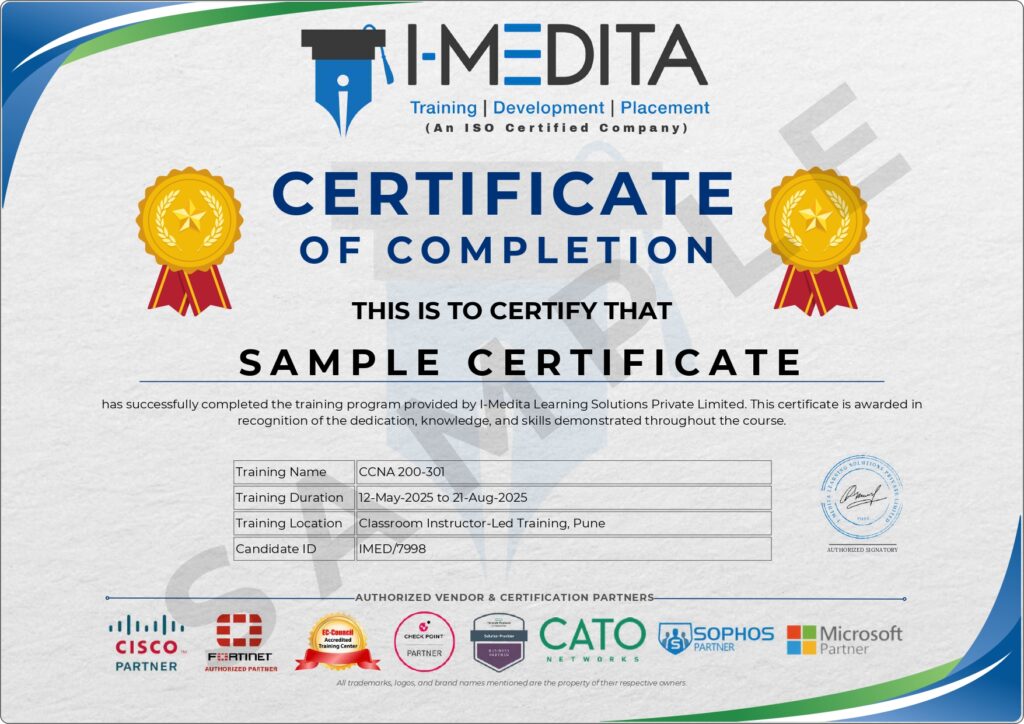
I-Medita Training Certificate
Issued upon successful course completion, the I-Medita certificate validates your training, hands-on lab experience, and project work completed during the program. It can be shared on LinkedIn, included in resumes, and used to showcase your networking skills to potential employers.
- Meet your mentors
Learn directly from CCIE-certified
experts
Learn from CCIE-certified experts with hands-on experience in enterprise networking, infrastructure deployment,
and network operations.
and network operations.

CCIE Sec # 37094, PCNSE, CCSE, MCSE
15+ Years of Experience
Baldev Singh

Triple CCIE EI, Security, SP # 46962
15+ Years of Experience
Saurabh Yadav

CCIE # 41212, AWS, PCNSE, CEH, CEI
12+ Years of Experience
Sudhanshu Bhat

CCIE EI # 60346, SDWAN, ENCOR
10+ Years of Experience
Surendra Singh
- WHY CHOOSE I-MEDITA
What sets us apart from other
CCNA institutes
A transparent head-to-head comparison so you can make an informed decision.
FEATURE
I-Medita
★ Top rated in Pune
Other institutes
Generic training
Trainer level
CCIE certified trainers
CCNA / CCNP trainers
Dedicated lab trainers
Separate lab support trainers
Usually not available
Lab access
Real Cisco labs · 24×7
Limited lab hours
Curriculum
Latest CCNA 200-301
Often outdated
Hands-on practice
Daily practical labs
Mostly theory
Study material
Physical books + digital
Notes / PDFs only
Placement support
Dedicated placement help
Basic guidance
Projects
Real-time projects
Few or none
Doubt support
1-to-1 support
Limited support
Demo session
Free demo available
Limited demo
OVERALL SCORE
I-MEDITA
10 / 10
OTHERS
3 / 10
Train with CCIE-certified experts, gain hands-on experience in real Cisco labs, and prepare confidently for certification and networking careers.
Enroll Now →
- Career Growth
Where CCNA takes you over the
next 6 years
Explore common networking roles, responsibilities, and salary growth opportunities after CCNA.
0–1 YEAR
Network Support / NOC Engineer
Monitoring, troubleshooting & device configuration
Next: CCNA Certification
START
AVG. SALARY IN INDIA
₹2.5 – 4.5 LPA
Entry level
AVG. SALARY IN INDIA
₹4.5 – 8 LPA
+78% growth
1–3 YRS
1–3 YEARS
Network Engineer / System Admin
Routing protocols, VLANs, IP services & maintenance
Next: CCNP Enterprise
3–6 YEARS
Senior Network Engineer
Network design, optimization & security
Next: CCIE Enterprise
3–6 YRS
AVG. SALARY IN INDIA
₹8 – 15 LPA
+233% growth
AVG. SALARY IN INDIA
₹15 – 25+ LPA
+900% from start
6+ YRS
6+ YEARS
Network Architect / Infra Manager
Enterprise architecture, automation & multi-site
Next: Security / Cloud / SDN
A Great place to learn
and grow
At I-Medita, we’re your launchpad for growth – a place where learning transforms into success.


- Upcoming Batches
Pick a batch that fits your
schedule
Multiple weekday, weekend and fast-track options — both online and offline in
Pune
Pune
| Course | Start Date | Time (IST) | Mode | Type | Enrollment |
|---|---|---|---|---|---|
| CCNA 200-301 | July 20, 2026 | 8:00 am - 10:00 am | Online / Offline | Upcoming | Enroll Now |
| CCNA 200-301 | August 3, 2026 | 10:00 am - 12:00 pm | Online / Offline | Upcoming | Enroll Now |
| CCNA 200-301 | August 17, 2026 | 12:00 pm - 2:00 pm | Online / Offline | Upcoming | Enroll Now |
| CCNA 200-301 | August 22, 2026 | 9:00 am - 12:00 pm | Online / Offline | Upcoming | Enroll Now |
| CCNA 200-301 | August 31, 2026 | 6:30 pm - 8:30 pm | Online / Offline | Upcoming | Enroll Now |
- Success Stories
What our placed alumni say
Real words from real students now working at India’s top networking companies
4.9
★★★★★
Based on 1897+ Google Reviews
Google Reviews
RS
Rahul Sharma
2 weeks ago
★★★★★
"Best CCNA training in Pune. CCIE certified trainers with real lab access. Got placed at Infosys within 6 weeks of completing the course!"
Posted on Google
PD
Priya Deshmukh
1 month ago
★★★★★
"24x7 lab access is the real game changer. I practiced on actual Cisco routers every day. Trainers are very patient and knowledgeable."
Posted on Google
AM
Aakash Mehta
3 weeks ago
★★★★★
"Placement team is excellent. Had 3 interviews before finishing the course. The mock interview sessions really helped me crack TCS."
Posted on Google
- FAQs
Everything you wanted to ask
Still have questions? Drop us a query below — we respond within 24 hours
Training Specific
What does the CCNA training program cover?
Our CCNA training covers the complete Cisco CCNA 200-301 syllabus — networking fundamentals, routing & switching, IP services (NAT/DHCP/DNS), security, wireless, automation, and SDN. Every concept is paired with hands-on labs on real Cisco devices.
Will I get to practise on real Cisco hardware?
Yes. You get 24×7 access to real Cisco routers (2611XM, 1841, 2811, 2811, 1905) and switches (2950, 2960, 3560, 3750), plus tools like GNS3, Cisco Packet Tracer and EVE-NG.
Is the course suitable for absolute beginners?
Yes — beginners with basic computer literacy can complete the course successfully. The curriculum starts from networking fundamentals and progresses to advanced topics with full mentor support.
Are interview questions and exam practice included?
Yes. The course includes interview questions, mock interviews and exam practice questions that mirror the official Cisco CCNA 200-301 pattern.
Will I be ready for the CCNA 200-301 exam after this course?
Yes. The training is fully aligned with the latest CCNA 200-301 syllabus and includes simulation-based practice tests so you walk into Pearson VUE confident.
Time & Mode
How long is the CCNA training?
Total duration is 80 hours, typically completed in 2–3 months depending on your batch (weekday, weekend or fast-track).
What batch options are available?
Weekday batches, weekend batches and fast-track options. New batches start every 2–3 weeks. Working professionals usually opt for weekend or evening batches.
Is the course available online or only classroom?
Both. You can attend live in our Baner, Pune classroom or join the same live session online from anywhere. The lab access works the same way for both modes.
Is the class taught in English or Hindi?
Both. Concepts are explained bilingually (English + Hindi) so every student understands clearly. Materials are in English.
Can I switch batches if I miss a session?
Yes. Missed sessions can be attended in a parallel batch, plus all sessions are recorded for revision.
Prerequisites
Do I need a technical background to enroll?
No mandatory prerequisites. Basic computer literacy is enough. We’ve trained students from non-technical backgrounds (BPO, sales, BCom, BA) who are now working network engineers.
Should I learn anything before joining?
It’s helpful but optional to know basics of operating systems, internet usage and IP addressing. We cover everything from scratch.
Is CCNA suitable for working professionals from non-IT?
Absolutely. Career switchers form a sizable share of our students. With weekend batches and structured placement support, the transition is very doable.
Placement
Is placement assistance really included?
Yes. Resume building, technical mock interviews, HR mock interviews, weekly job alerts and direct introductions to our hiring partner network are all included.
What companies hire from I-Medita?
Our students work at TCS, Infosys, Wipro, HCL, Tech Mahindra, Accenture, Capgemini, Reliance Jio, Tata Communications, Airtel and many more.
What salary can I expect after CCNA?
Freshers with CCNA typically earn ₹2.5 – 4.5 LPA. With 1–3 years of experience and CCNP, this scales to ₹4.5 – 8 LPA. Senior roles touch ₹15 LPA+.
Is placement guaranteed?
We offer placement assistance. Final placement depends on your performance, technical knowledge and interview skills but our process is built to maximize your chances.
Payment
What is the course fee?
Please reach out to our team at +91 87500 04411 for information about the course fee, current discounts, and ongoing promotional offers.
Are EMI options available?
Yes. Easy 3 / 6 / 9-month no-cost EMI options are available via partner finance providers. Talk to our counsellor for details.
Do you offer a free demo class?
Yes. Book a free demo using the form on this page. You’ll get a free 1-hour live session with a CCIE-certified trainer before paying anything.
Is the fee refundable?
Please refer to our Refund Policy and Terms & Conditions available on the website for complete details. We strongly recommend attending a free demo session before enrollment to ensure the course meets your expectations. If you have any questions regarding refunds, our admissions team will be happy to assist you before enrollment.
What payment options do you accept?
We accept multiple payment options, including cash, UPI, debit cards, credit cards, EMI, net banking, digital wallets, cheques, demand drafts (DD), and PayPal. For assistance with payments or EMI options, please contact our admissions team.
Certificate
Will I get a certificate after the course?
Yes. You receive an I-Medita Training Completion Certificate plus full preparation for the official Cisco CCNA 200-301 certification (booked separately at Pearson VUE).
Is the I-Medita certificate recognized in the industry?
Yes. I-Medita has been training network engineers since 2014 and our certificate is recognized across our 100+ hiring partner network.
How do I take the official Cisco CCNA exam?
Schedule via Pearson VUE — at a test center or online via OnVUE proctored mode. We help you book the exam at a discounted voucher rate.
How long is the Cisco CCNA certification valid?
3 years. You can renew by passing another Cisco exam, an Expert-level exam, or by earning 30 Continuing Education credits.
Need Assistance
Whom do I contact for course queries?
Call us at +91 95956 09000 (Mon–Sat, 9 AM – 8 PM) or email info@imedita.com. You can also use the assistance form below — we respond within 24 hours.
Can I visit the institute before enrolling?
Yes — walk into our Baner, Pune campus any working day between 10 AM – 7 PM. Address: 2nd & 3rd Floor, Aditi Samruddhi Building, Baner Road, Baner, Pune 411045.
I'm stuck choosing the right course — can I talk to someone?
Yes. Submit the assistance form below or book a free demo. Our career counsellor will give you 1-to-1 free guidance on the right Cisco track for your goals.
- NEED FURTHER ASSISTANCE?
Get Personalized Guidance Before You Enroll
Get in touch with our team for personalized guidance on course content, batches, fees, certifications, and career opportunities.
- +91 8750004411
- info@imedita.com
- 3rd Floor, Aditi Samruddhi Building, Baner Road, Baner, Pune - 411045

Popular 100% Job Guaranteed Programs
Popular Network Security Programs
Popular Trending Courses
- Cisco CCNA Certification Training
- Cisco SD-Access Training
- Cisco CCNP Enterprise Certification Training
- Cisco CCIE Enterprise Certification Training
- Cisco ENARSI Certification Training
- Cisco CCNP Security Certification Training
- Cisco CCIE Security Certification Training
- AWS Certification Training
- CEH Certification Training
- Cisco SD-WAN Certification Training
- Palo Alto PCNSE Certification Training
- Checkpoint CCSE Certification Training
- F5 Load Balancer Certification Training
Trending Free Resources
Address
3rd Floor, Aditi Samruddhi Building,
Baner Road, Baner, Pune – 411 045, Maharashtra, India
Landmark: Near Baner Welcome Board.
© 2026-2027 – I-Medita Learning Solutions. All Rights Reserved. The certification names are the trademarks of their respective owners.
3rd Floor, Aditi Samruddhi Building,
Baner Road, Baner, Pune – 411 045, Maharashtra, India
Landmark: Near Baner Welcome Board.
© 2026-2027 – I-Medita Learning Solutions. All Rights Reserved. The certification names are the trademarks of their respective owners.